


Synthesia
3.85.37K Reviews
App Specs
- Version
- 10.10.6001
- Updated On
- License
- Free
- Downloads
- 10,000,000+
- Developer
- Synthesia LLC
- Categories
- Music & Audio
- Platform
- Android
Screenshots
 Analysis by AppCompare
When I first opened Synthesia, I wanted to know one thing: could it help me make a real start at the piano without turning practice into a chore? Its falling-note approach gives you an immediate, visual way to follow a melody, and the app is aimed at people who want to learn by trying notes rather than beginning with pages of explanation. I found that inviting, though it is worth understanding what this style of learning can and cannot teach before making it your only piano resource.
What to expect from the falling notes
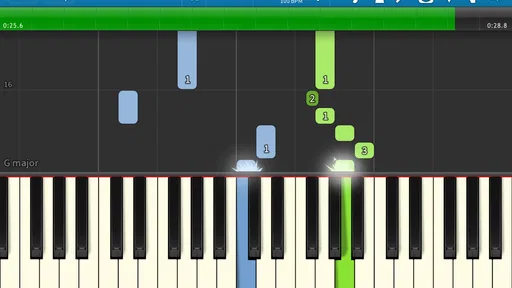
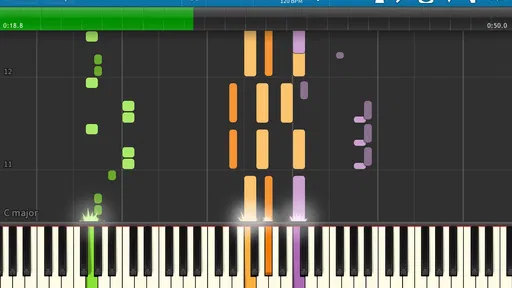
Synthesia is a music and audio app from Synthesia LLC. It is free to install, rated for Everyone, and has an average rating of 3.9 from around 92,000 ratings, with over 10 million installs. Its core appeal is easy to grasp: notes move down the screen, giving you a visual cue for what to play. That can make a first attempt feel less abstract than reading notation cold, especially if you are curious about piano but do not yet know where to begin.
The trade-off is that following a visual cue is not the same as learning every part of musicianship. The falling notes can help you connect a sound or position with a key, but I would treat the app as a practice aid, not a complete substitute for listening carefully, understanding rhythm, or getting feedback from a teacher. If your goal is simply to explore a tune and build confidence at home, the visual format is a comfortable entry point. If you want a structured course in technique and music theory, you may want to pair it with lessons or another learning resource.
Getting Started with Synthesia
First off, diving into Synthesia is super easy. After downloading the app, you’ll find an intuitive interface that welcomes both beginners and seasoned players. The setup process is straightforward, and before you know it, you’re on your way to playing your favorite tunes. There’s just something exciting about seeing those colorful notes scrolling down the screen, prompting you to press the right keys. It’s like Guitar Hero, but for piano enthusiasts!
Making the first practice session count
For a first session, I would keep the target small: choose a short passage, slow it down, and aim to play it steadily rather than rushing to finish a whole song. That gives you a clearer sense of whether you are recognizing the notes or merely reacting to the screen. A useful habit is to repeat the same section after a brief pause; if the second attempt feels easier, you have a practical sign that the pattern is starting to stick.
If you are using only the phone or tablet screen, treat that as a convenient way to explore, not necessarily the best setup for building full two-handed piano technique. A physical MIDI keyboard gives your hands a more natural layout and makes it easier to notice fingering and spacing. On-screen playing is still useful when you are away from an instrument or want to test the basic idea before setting up a keyboard.
Features that Hit the Right Note
One of the coolest features of Synthesia is its ability to connect to a MIDI keyboard. If you’ve got one lying around, hooking it up is a breeze, and it seriously elevates your learning experience. You can also use the on-screen touch keyboard if you’re on the go or don’t have a MIDI around. Talk about convenience!
Worth Reading Before You Choose

EA SPORTS FC Mobile 26 Is a Bigger Football Game, but It Takes Time

Flipboard Shows What News Apps Must Do Beyond the Feed

Switching to Android Auto Means Rethinking Your Driving Routine

Google Calendar Makes a Crowded Week Easier to Manage

Ludo King Makes the Most of the Minutes Between Plans

Baby Panda World Brings Quick Play to Modern Phones, but Its Game Library Feels Busy
The app’s song library is pretty extensive. Whether you’re into classical pieces or modern hits, there’s something for everyone. You can even import your own MIDI files, which is perfect if you’re looking to learn a specific song that’s not already in the library. Plus, the ability to adjust the tempo means you can start slow and speed up as you get more confident.
Choosing songs and working with MIDI
Importing a MIDI file is especially useful when you already have a particular piece in mind. Before you build a practice routine around one, check that the file contains the musical parts you actually want to learn; a MIDI arrangement can include several layers, and a busy arrangement may be confusing when you are just starting out. I would begin with a simpler passage and use the tempo control to make it manageable, then return to the original pace only when the notes feel familiar.
This is also where Synthesia differs from many conventional piano-learning apps. Some alternatives emphasize guided lessons, written explanations, or a course that moves from one skill to the next. Synthesia’s more immediate strength is visual, song-based practice: it can make repeating a passage feel approachable, but it does not automatically explain why a chord works or how to read every mark in a score. If you enjoy learning by doing and already have songs you want to try, that is a helpful distinction. If you need a teacher-like path with detailed instruction, a lesson-focused app or a human tutor may suit you better.
Learning at Your Own Pace
What I love about Synthesia is the flexibility it offers. You can learn at your own pace without any pressure. The app provides instant feedback on your performance, so you know exactly which notes you’re nailing and which ones need a little more practice. It’s like having a patient tutor who’s always ready to guide you.
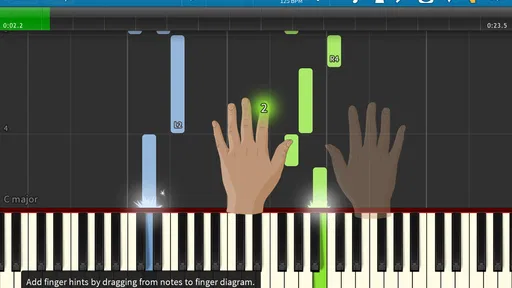
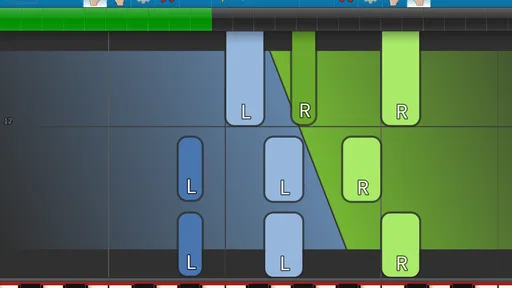
For those who love to track their progress, the app keeps a record of your scores and improvements over time. It’s satisfying to see those scores climb as you practice more and more. Plus, there’s an option to practice hands separately, which is super helpful for tricky parts that need extra attention.
A routine that fits ordinary days
A realistic way to use the app is to fit a short practice into a moment you already have: after dinner, for example, you could connect a MIDI keyboard, work on one difficult phrase with one hand, and then try it again at a slightly quicker tempo. The point is not to chase a score every evening. It is to make one small section more comfortable, so the next session begins with something familiar rather than a blank slate.
Hand separation is more than a convenience for beginners. When both parts are demanding, trying to learn them together can make it hard to tell whether the trouble is in the notes, timing, or coordination. Practicing each hand on its own helps isolate the problem; only after each part feels steady would I combine them. Conversely, if you already play comfortably, separating hands for a passage you know may add little value, so you can spend your time on the section that actually challenges you.
Interface and Usability
The app’s interface is clean and user-friendly. Even if you’re a complete newbie when it comes to music apps, you’ll find navigating through Synthesia a breeze. The settings are straightforward, allowing you to customize your learning experience to suit your preferences.
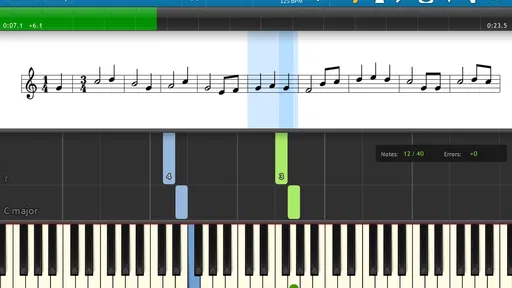
The visuals are not just functional but also appealing. The colorful note animations are engaging and help maintain focus. There’s also the option to switch to different views depending on what works best for you. Whether you prefer a traditional sheet music display or the falling notes view, Synthesia has got you covered.
Sorting out common first-time confusion
If a passage feels impossible at first, I would not assume that you are failing or that the app is malfunctioning. The piece may simply be too fast or too dense for a first attempt. Slow it down, work on a smaller part, and separate the hands if that helps you identify what is going wrong. A visual stream can make the next note obvious, but it still takes repetition to make the movement feel natural.
Another useful distinction is whether you are practicing recognition or performance. On-screen keys can help you understand the basic layout, while a MIDI keyboard gives you a more realistic physical practice experience. Neither choice is universally right: the screen is convenient for a quick try, and a keyboard is better when you want to build coordination at an instrument. If your main question is whether you can begin without owning a keyboard, the touch option offers a way to explore; if your aim is to develop piano technique, a real keyboard is the more meaningful practice surface.
Who will get the most from it
I think Synthesia is best for curious beginners, casual players returning to piano, and anyone motivated by learning particular songs. It is also a practical choice for a household that already has a MIDI keyboard and wants a visual way to practice at home. A complete beginner can use it to make the first steps less intimidating, while an experienced player may find it handy for working through a MIDI arrangement or isolating a tricky passage.
I would skip it as a sole learning method if you need step-by-step instruction in posture, fingering, rhythm, or theory, or if you strongly prefer a teacher to explain mistakes in context. The falling notes can show you what to press, but a display cannot watch your hand position or tell you whether you are building a relaxed technique. In that situation, lessons or a structured course make a better main resource, with Synthesia serving as an extra practice tool rather than the whole plan.
Version, cost, and what to consider
The current version is 10.10.6001, and the app requires Android 6.0 or later. The basic app is free, with in-app purchases listed at $7.99 per item. I would start by trying the free experience and checking whether its visual approach suits the way you like to practice before considering any purchase. That keeps the decision grounded in your own routine: a feature is only worth paying for if it solves a practice problem you actually have.
It is also worth thinking about your setup before you commit to regular use. If you plan to practice at a keyboard, make sure you are comfortable connecting and using your MIDI instrument with your device. If you are only experimenting on a touchscreen, keep expectations modest about how much that will transfer to playing a full-size keyboard. The best setup is the one you will use consistently, not the one that looks most impressive on day one.
Wrapping Up: Is Synthesia Worth It?
In my opinion, if you’ve ever wanted to learn piano or improve your skills, Synthesia is totally worth checking out. It’s a fun, interactive way to dive into music without the intimidation of traditional methods. Whether you’re practicing for fun or getting serious about learning, this app provides the tools and flexibility you need.
Overall, Synthesia makes piano learning accessible and enjoyable for everyone. So grab your keyboard (or your phone) and start tinkling those ivories. Who knows? You might just discover your inner Mozart!
My practical recommendation
I would approach it as a low-pressure way to get moving: pick a song or passage you genuinely want to play, slow it down, and give yourself permission to repeat only a few notes until they feel familiar. If you enjoy that process, the visual feedback and MIDI support can make it easier to keep returning to practice. If you find yourself wanting explanations beyond which notes to press, add a course, sheet-music study, or lessons rather than expecting the app to cover every part of learning piano.
That balance is why I would recommend it selectively rather than calling it a perfect fit for every pianist. For a first-time user who wants an encouraging route from opening the app to playing a recognizable phrase, it offers a clear place to begin. For someone who needs comprehensive instruction or detailed coaching on technique, it works better as one useful tool among several.
Pros
- User-friendly interface for easy navigation.
- High-quality video output with lifelike avatars.
- Supports multiple languages and accents.
- Customizable scripts for personalized content.
- Quick processing and rendering times.
Cons
- Limited free features; upgrades can be costly.
- Occasional glitches in avatar lip-syncing.
- Requires stable internet for smooth operation.
- Customization options can feel limited.
- May not support all video formats.
FAQs for Synthesia
What is Synthesia and how does it work?
Synthesia is an AI-driven video creation platform that allows users to create professional-quality videos without needing a camera or studio setup. By using AI avatars, you can generate video content by simply typing in text. This makes it accessible for businesses and content creators looking to produce videos efficiently.
Is Synthesia suitable for beginners or do I need technical skills?
Synthesia is designed to be user-friendly and requires no prior video editing experience. Its intuitive interface allows beginners to create videos by selecting an avatar, inputting text, and choosing from various templates. Advanced users can also customize their videos further for more personalized content.
Can I use Synthesia for commercial purposes?
Yes, Synthesia offers commercial licenses, allowing businesses and creators to use the platform for marketing, training, and other professional purposes. Check the specific terms and conditions of the license to ensure compliance with your intended use.
What languages does Synthesia support?
Synthesia supports multiple languages, making it a versatile tool for global businesses and creators. The platform continually updates to include more languages, so it's advisable to check their official site for the most current list of supported languages.
Are there any limitations on video length or output quality in Synthesia?
Synthesia offers various plans, each with different limits on video length and output quality. While basic plans may have restrictions, premium subscriptions typically allow for longer videos and higher resolution outputs. Review the specific plan details on their website to choose the best option for your needs.


